- User Stories
1.1. User Story 247076: FleetLogic - Update the Selection List component to support group view.
- A User will have the ability to switch between List View and Group View when assigning vehicles, groups, drivers, or locations.
- The following views have been updated:
Area | Icon | View |
Vehicle Management - Locations Tab |
| List and Group View |
Vehicle Management – Drivers Tab |
| List and Group View |
Driver Management | Set Allowed Vehicles | List and Group View |
Location Management | Link | List and Group View |
Working hours | Link | Group View |
Groups - Vehicle Members Column | Manage Group Vehicles | List View |
Groups - Driver Members Column | Manage Group Drivers | List View |
Groups - Area Members Column | Manage Group Areas | List View |
Routes | Link Vehicles | List and Group View |
Inspection Management | Vehicle Assignment | List and Group View |
User Management | Vehicle Access | List and Group View |
- The user will have the ability to search for records on both list and group view.
- If a record exists in both the Available and Selected lists, it will be displayed in both lists where applicable.
- The following actions are now available:
- Transfer record to selected list
- Transfer all to selected list
- Transfer to available list
- Transfer all to available list
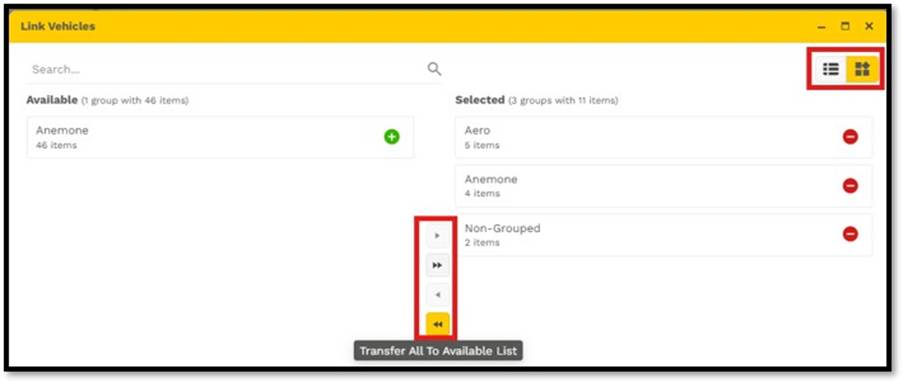
- The user can drag and drop records between the Available and Selected lists for easier assignment management.
- Please note, for locations with an assignment limit of 10 or 50 records, selecting Transfer All will transfer only the maximum number of records allowed. If more records are available, only the first 10 or 50 records will be selected.
- Access Restriction on User Management, the current logged in user or Super Administrator will not have the ability to transfer any records.
- Bugs
2.1. Bug 248551: FleetLogic - Vehicle Management - Unable to close an Alert on the Alerts Tab
- An issue was identified where an error occurred when closing an alert from the Alerts tab within Vehicle Management. This has been resolved; users can now press Save and Save & Close button options when updating alerts details, without an error showing.
- Please verify that alerts can also be closed on Live Tracking > Alerts tab.
2.2. Bug 248024: FleetLogic - AA - 403 Error appears when Vehicles is visible
· When the following permissions were enabled on a role, access was granted to a user, and the user logged in, navigating to Vehicle Management resulted in an unauthorized error. This issue has been resolved; the user will now be able to view the Vehicles grid.
a) Expense Management
- View Expenses
b) Notification Configurations Management
- View Notification Configurations
- Create Notification Configurations
- Edit Notification Configurations
- Delete Notification Configurations
c) Vehicle Management
- View Vehicles
2.3. Bug 248025: FleetLogic - AA - 403 Error appears when Edit Notification is enabled
· When the following permissions were enabled on a role, access was granted to a user, and the user logged in, navigating to Notification Configuration Management à Edit record, resulted in an unauthorized error. This issue has been resolved; the user will now be able to modify a notification.
a) Expense Management
- View Expenses
b) Notification Configurations Management
- View Notification Configurations
- Create Notification Configurations
- Edit Notification Configurations
- Delete Notification Configurations
c) Vehicle Management
- View Vehicles
2.4. Bug 248051: FleetLogic - AA - 403 Error appears when Emailing an Installation Certificate
- When the following permissions were enabled on a role, access was granted to a user, and the user logged in, navigating to Vehicle Management à Units Tab à Email Installation certificate, resulted in an unauthorized error. This issue has been resolved; the user will now be able to email the Installation certificate.
a) Expense Management
- View Expenses
b) Notification Configurations Management
- View Notification Configurations
- Create Notification Configurations
- Edit Notification Configurations
- Delete Notification Configurations
c) Vehicle Management
- View Vehicles
- Edit Vehicles
- View Unit Input Configuration
- View Unit Output Configuration
- View Unit Buzzer Configuration
- Update Unit Buzzer Configuration
- View Vehicle Settings
- Update Vehicle Settings
- Download Installation Certificate
- Email Installation Certificate
2.5. Bug 248222: FleetLogic - Maintenance - No loading indicator appears when completing a maintenance request
- When completing a maintenance request under Maintenance management, selecting an associated Expense and saving, the loading indicator did not display as expected. This issue has been resolved; the loading indicator is now displayed when saving.
2.6. Bug 248517: FleetLogic - Routes - Drawing tool remains expanded when navigating away from Click on map
- When creating or modifying a route and selecting the "Click on Map" radio button, the drawing tool would automatically expand. However, when navigating to any of the other address options (listed below), the drawing tool remained expanded. This issue has been resolved. The drawing tool will now only expand when the "Click on Map" radio button is selected.
- Search for an address
- Enter Coordinates
- Select a Location
2.7. Bug 248549: FleetLogic - Routes - Tool tip not displaying on addresses
- When modifying a route where an address had already been added as a Destination, the full address was not displayed. This issue has been resolved. The complete address will now be shown in a tooltip when hovering over the ellipsis (...).
2.8. Bug 248552: FleetLogic - Routes - Click on Map text holder must be renamed to 'Add a point'
- When creating or modifying a route and selecting the "Click on Map" radio button, the placeholder text has been updated to display "Click on map to add a point"
Was this article helpful?
That’s Great!
Thank you for your feedback
Sorry! We couldn't be helpful
Thank you for your feedback
Feedback sent
We appreciate your effort and will try to fix the article