- User can view, search, save, download, and refresh for an Invoice.
- To Search, use the search bar which can be found on the left.

- Users can print an invoice by clicking on the print icon.

- Invoices can be downloaded as a pdf by clicking on the download icon on the left of the line item

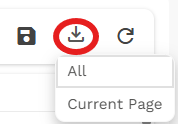
- Users can export a list of all selected invoices as an excel document by clicking on the download icon at the top right
Was this article helpful?
That’s Great!
Thank you for your feedback
Sorry! We couldn't be helpful
Thank you for your feedback
Feedback sent
We appreciate your effort and will try to fix the article