Audit Logs
Audit logs can be used for tracking changes done by a user
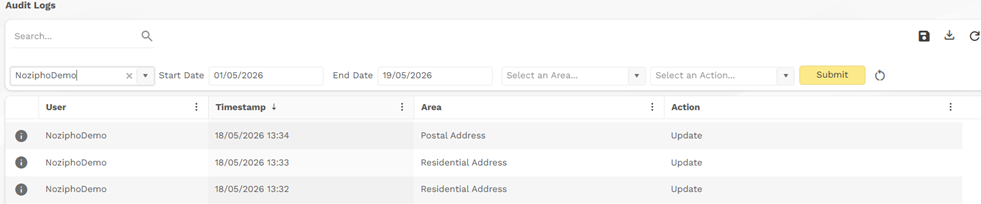
- The user can User can view, search, download a report of changed done.
- Search: Use the search bar which can be found on the left to search for a specific user.
- Select a user: Can be used to select a specific user.
- Start Date: Allows you to select a date that you would like to start your search
- End Date: Allows you to select a date that you would like to end your search
- Select an Area: Allows you to select a specific change you would like to see where changes were made.
- Select an Action: Allows you to select the type of change that was done

Once submitted the be below would appear containing
- User: The user you were searching for
- Timestamp: When was the changes done
- Area: Where were the changes being done
- Action: What type of action was done
Was this article helpful?
That’s Great!
Thank you for your feedback
Sorry! We couldn't be helpful
Thank you for your feedback
Feedback sent
We appreciate your effort and will try to fix the article